Navigation Font Overview
Search Glyphs
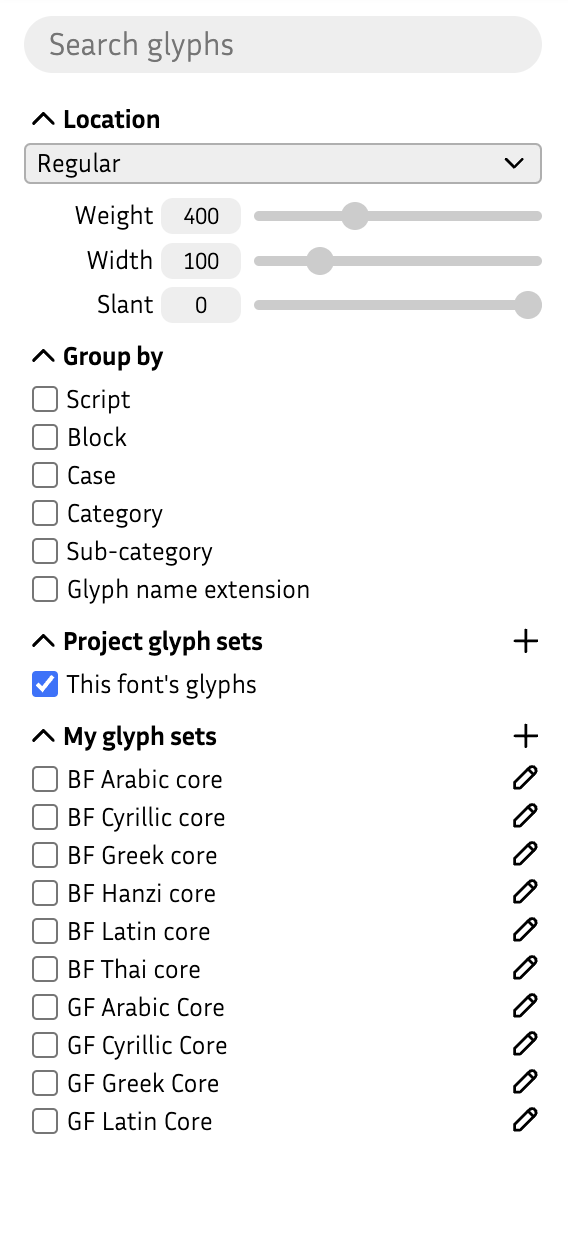
Search for glyphs containing the entered text, for example grave shows Agrave, Egrave, Igrave, etc.
Location
Dropdown : Choose a font source to navigate to a location in the design space
Slider(s) : Use the sliders to navigate continuously within the design space
Group by
Organize the glyphs of the font by one or many of the following categories.
Script : Group by script (a script is not a language: Cyrillic ≠ Bulgarian)
Block : Group by unicode block
Case : Group by case, organizing in upper-, lower- and minor-case
Category : Group by category, for example: Letter, Number, Punctuation, etc.
Sub-category : Group by sub-category, for example: Superscript, Fraction, Quote, etc.
Glyph name extension : Group by glyph name extension, for example .case, .numerator, etc.
Pro tip:
- Try: Group by Category + Sub-Category.
Project glyph sets
Project specific glyph sets (activate one or many via checkboxes).
This font’s glyphs : Shows all glyphs of the font project
 *
: Add a new glyph set to this specific font project
*
: Add a new glyph set to this specific font project
My glyph sets
User-specific glyph sets (activate one or many via checkboxes). These are not stored in the font, but locally for the user.
*
: Add a new glyph set to your Fontra environment
 : Click on the icon to show the **context menu**
* A glyph set must be publicly available (for example via github)