Transformations
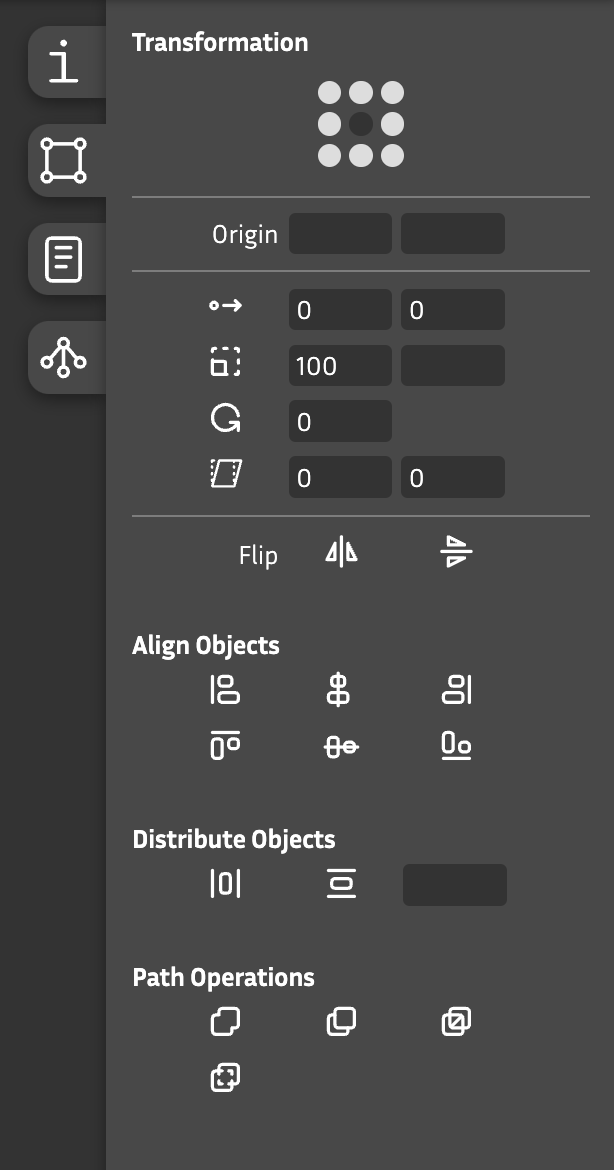
Transformations
Transform a selection of points, contours and/or components.
Origin based on selection : Specify the transformation origin based on the selection – from top to bottom and/or left to right.
Origin : Be more precise with a specific x and y position.
 : Move in x and/or y direction. Values: **units**.
 : Scale in x and/or y direction. Values: **percentage** (100% = no scaling).
 : Rotate. Value: **degree** (- = clockwise, + = counter clockwise).
 : Skew in x and/or y direction. Value: **degree**.
 : Flip horizontally.
 : Flip vertically.
Align Objects
Align a selection of points, contours and/or components.
 : Align left
 : Align center (vertically)
 : Align right
 : Align top
 : Align middle (horizontally)
 : Align bottom
Distribute Objects
Distribute a selection of points, contours and/or components.
 : Distribute horizontally
 : Distribute vertically
Distance of distribution : The distance will be calcutated, if not set. Otherwise: specify the distance in units.
Path Operations
Keep in mind that path operations work with two groups: the selected and the unselected contours.
 : Remove Overlaps -> removes overlaps of selection only.
 : Subtract contours -> subtracts the selected contours from the unselected contours.
 : Intersect contours
 : Exclude contours